



'/%3e%3c/svg%3e) 发布
发布 ;}.c{fill:%233f3f3f;}%3c/style%3e%3cclipPath%20id='a'%3e%3crect%20class='a'%20width='24'%20height='24'%20transform='translate(0%20-0.256)'/%3e%3c/clipPath%3e%3c/defs%3e%3cg%20transform='translate(0%200.256)'%3e%3cg%20class='b'%3e%3cpath%20class='c'%20d='M12.938,13.58a.745.745,0,0,1-.328-.076L4.549,9.523a.741.741,0,0,1,0-1.33L12.61,4.212a.74.74,0,0,1,.657,0l8.061,3.981a.741.741,0,0,1,0,1.33L13.267,13.5a.741.741,0,0,1-.329.076M6.553,8.858l6.385,3.153,6.386-3.153L12.938,5.705Z'%20transform='translate(-1.067%20-1.067)'/%3e%3cpath%20class='c'%20d='M12.939,20.964a.729.729,0,0,1-.328-.077l-8.062-3.98a.742.742,0,1,1,.657-1.33l7.733,3.818,7.733-3.818a.742.742,0,1,1,.657,1.33l-8.062,3.98a.729.729,0,0,1-.328.077'%20transform='translate(-1.067%20-3.999)'/%3e%3cpath%20class='c'%20d='M12.939,26.964a.729.729,0,0,1-.328-.077l-8.062-3.98a.742.742,0,1,1,.657-1.33l7.733,3.818,7.733-3.818a.742.742,0,1,1,.657,1.33l-8.062,3.98a.729.729,0,0,1-.328.077'%20transform='translate(-1.067%20-5.547)'/%3e%3c/g%3e%3c/g%3e%3c/svg%3e)
;}.c{fill:%233f3f3f;}%3c/style%3e%3cclipPath%20id='a'%3e%3crect%20class='a'%20width='24'%20height='24'%20transform='translate(0%200.225)'/%3e%3c/clipPath%3e%3c/defs%3e%3cg%20transform='translate(0%20-0.225)'%3e%3cg%20class='b'%3e%3cpath%20class='c'%20d='M21.648,9.056a.754.754,0,0,0-.215-.535l-5.3-5.3a.752.752,0,0,0-.535-.215V3H7.375A2.377,2.377,0,0,0,5,5.376V20.307a2.377,2.377,0,0,0,2.375,2.376h11.9a2.378,2.378,0,0,0,2.376-2.376V9.056ZM16.355,5.584,19.07,8.3H16.923a.569.569,0,0,1-.568-.568Zm2.924,15.584H7.375a.862.862,0,0,1-.861-.861V5.376a.862.862,0,0,1,.861-.861h7.466V7.731a2.084,2.084,0,0,0,2.082,2.082H20.14V20.307a.863.863,0,0,1-.861.861'%20transform='translate(-1.215%20-0.729)'/%3e%3cpath%20class='c'%20d='M10.757,15.514H15.3A.757.757,0,0,0,15.3,14H10.757a.757.757,0,0,0,0,1.514'%20transform='translate(-2.43%20-3.402)'/%3e%3cpath%20class='c'%20d='M18.327,20h-7.57a.757.757,0,0,0,0,1.514h7.57a.757.757,0,0,0,0-1.514'%20transform='translate(-2.43%20-4.86)'/%3e%3c/g%3e%3c/g%3e%3c/svg%3e)
;}.cls-3{fill:%23dbdbdb;}.cls-4{stroke:%23333;stroke-miterlimit:10;stroke-width:0.5px;}%3c/style%3e%3cclipPath%20id='clip-path'%3e%3crect%20class='cls-1'%20width='22'%20height='22'/%3e%3c/clipPath%3e%3c/defs%3e%3cg%20class='cls-2'%3e%3cpath%20class='cls-3'%20d='M16.89,7.8s-1,4.28-4,6a21,21,0,0,1-6.55,1.66,9.87,9.87,0,0,0,6.38,1c3.47-.72,6.82-4.66,6.71-5.43A5.88,5.88,0,0,0,17.6,8.17,2.76,2.76,0,0,0,16.89,7.8Z'/%3e%3cellipse%20class='cls-4'%20cx='11'%20cy='10.94'%20rx='8.53'%20ry='5.49'/%3e%3ccircle%20class='cls-4'%20cx='11'%20cy='10.94'%20r='2.49'/%3e%3c/g%3e%3c/svg%3e)
【进迭时空 K1 MUSE Pi Pro】车牌识别
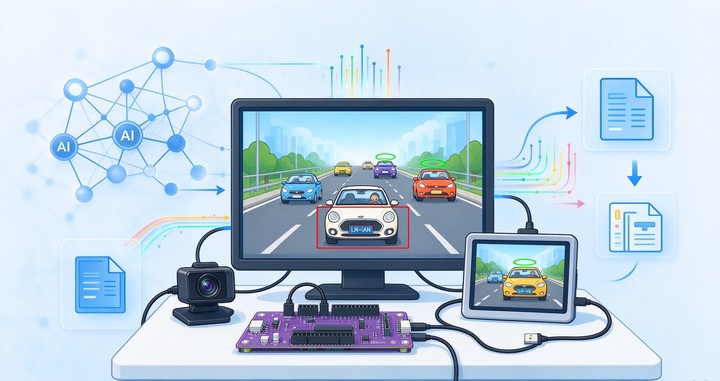
本文介绍了进迭时空 K1 MUSE Pi Pro 开发板结合 LPRNet 算法和 Ultralytics 库实现物车牌识别的项目设计,包括环境部署、软件包安装、模型获取、关键代码以及板端推理等相关流程。
项目介绍
准备工作:OpenCV 安装、Ultralytics 软件包安装、预训练模型下载等;
车牌识别:采用 LPRNet 算法及 ONNX 模型实现车牌识别的板端推理;
硬件连接
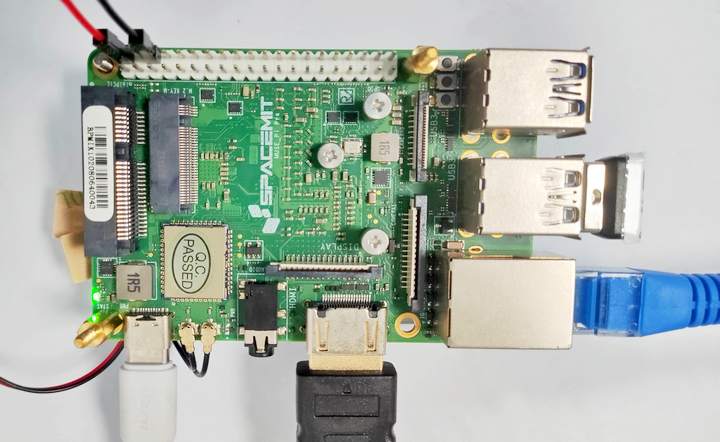
使用网线连接路由器和 LAN 接口,或连接 Wi-Fi 无线网;
连接鼠标键盘至 USB 端口;
使用 5V 直流电源 Type-C 供电;
环境搭建
为了快速实现图像分类,需完成 OpenCV 部署和 Ultralytics 软件包的安装等操作。
终端执行如下指令,搭建虚拟环境并安装所需软件包
sudo apt update
sudo apt install python3-venv # 安装虚拟环境软件包
python3 -m venv .venv # 创建虚拟环境
pip config set global.extra-index-url https://git.spacemit.com/api/v4/projects/33/packages/pypi/simple # 更改pip镜像源
source .venv/bin/activate # 激活虚拟环境
pip install opencv-python # 安装 opencv
pip install pillow opencv-python numpy matplotlib tqdm requests psutil pyparsing
pip install torch torchvision ultralytics
安装完成后,执行下列指令进行验证
python3 -c "import ultralytics, sys, torch; print('ultralytics', ultralytics.__version__, '| torch', torch.__version__, '| Python', sys.version.split()[0])"输出 ultralytics 版本号
详见:【进迭时空 K1 MUSE Pi Pro】YOLO26 部署测试 - 华秋开源硬件社区 .
字体安装
为了方便显示中文车牌,安装 CJK 字体
sudo apt install fonts-noto-cjk
fc-list | grep -i "Noto Sans CJK" | head -3
记录字体所在路径,如 /usr/share/fonts/opentype/noto/NotoSansCJK-Regular.ttc 以便调用。
模型获取
终端执行如下指令
wget https://github.com/h030162/PlateRecognition/blob/main/ocr_rec.py
cd ./model # 模型存放在 model 文件夹
wget https://github.com/h030162/PlateRecognition/blob/main/license_models/y11n-pose_plate_best.onnx
wget https://github.com/h030162/PlateRecognition/blob/main/license_models/y11n-pose_plate_best.pt
wget https://github.com/h030162/PlateRecognition/blob/main/license_models/license_ocr.onnx
wget https://github.com/h030162/PlateRecognition/blob/main/license_models/dict.txt详见:sirius-ai/LPRNet_Pytorch , h030162/PlateRecognition .
文件目录
~/lpr $ tree
.
├── img
│   ├── ji.jpg
│   ├── ...
│   └── yue.jpg
├── lpr_demo.py
├── model
│   ├── dict.txt
│   ├── license_ocr.onnx
│   ├── y11n-pose_plate_best.onnx
│   └── y11n-pose_plate_best.pt
└── ocr_rec.py
流程图

工程代码
终端执行 touch lpr_demo.py 新建文件,添加如下代码
import numpy as np
import cv2
from ocr_rec import TextRecognizer, init_args
from PIL import Image, ImageDraw, ImageFont
from ultralytics import YOLO
import warnings
warnings.filterwarnings("ignore")
class PlateRecognizer:
    def __init__(self, det_model_path="./model/y11n-pose_plate_best.onnx"):
        self.model_det = YOLO(det_model_path)
        parser = init_args().parse_args()
        self.model_ocr = TextRecognizer(parser)
    def recognize(self, img):
        plate_objs=[]
        # detect plates
        plates = self.model_det(img, verbose=False)
        for plate, conf in zip(plates[0].boxes.xyxy, plates[0].boxes.conf):
            x1, y1, x2, y2 = plate.cpu()
            x1, y1, x2, y2 = int(x1), int(y1), int(x2), int(y2)
            plate_img = img[y1:y2, x1:x2]
            # recognize text
            try:
                rec_res, _ = self.model_ocr([plate_img])
            except Exception as E:
                print(E)
                exit()
            if len(rec_res[0])>0:
                obj = {}
                obj['text'] = rec_res[0][0]
                obj['score_text'] = rec_res[0][1]
                obj['bbox'] = [x1, y1, x2, y2]
                obj['score_bbox'] = conf.cpu().numpy().item()
                plate_objs.append(obj)
        return plate_objs


def DrawPlateNum(img, palte_num, x1, y1):
    img_rgb = cv2.cvtColor(img, cv2.COLOR_BGR2RGB)
    img_pil = Image.fromarray(img_rgb)
    draw = ImageDraw.Draw(img_pil)
    font = ImageFont.truetype("/usr/share/fonts/opentype/noto/NotoSansCJK-Regular.ttc", 40)
    # ===== 文字位于车牌上方 =====
    try:
        _, top, _, bottom = draw.textbbox((0, 0), palte_num, font=font)
        text_h = bottom - top
    except AttributeError:                       # 旧版本 Pillow
        text_h = font.getsize(palte_num)[1]

    ty = y1 - text_h - 6                         # 6 为间隙,避免贴框
    if ty < 0 and y2 is not None:                # 若车牌靠上,则下方画框
        ty = y2 + 6
    # =====================================
    draw.text((x1, ty), palte_num, font=font, fill=(255, 255, 0))
    img_bgr = cv2.cvtColor(np.array(img_pil), cv2.COLOR_RGB2BGR)
    return img_bgr

def demo():
    parser = init_args().parse_args()
    img = cv2.imread(parser.image_path)
    if img is None:
        print("Error: no image found")
        return
    plate_rec = PlateRecognizer()
    plate_objs = plate_rec.recognize(img)
    print(plate_objs)
    for bbox in plate_objs:
        x1, y1, x2, y2 = bbox['bbox']
        cv2.rectangle(img, (x1, y1), (x2, y2), (0, 0, 255), 2)
        img = DrawPlateNum(img, bbox['text'], x1, y1)
    cv2.imshow("LPR", img)
    cv2.waitKey(0)
    # cv2.imwrite("result.jpg", img)

if __name__ == "__main__":
    parser = init_args().parse_args()
    demo()
保存代码。
效果演示
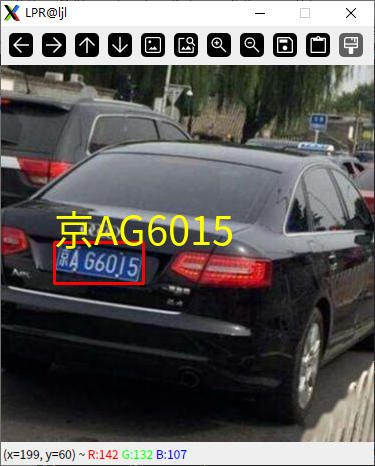
终端执行指令 python lpr_demo.py -i ./img/jing.jpg 运行识别程序;
终端打印识别结果,置信度等信息;

弹窗显示结果
更多测试
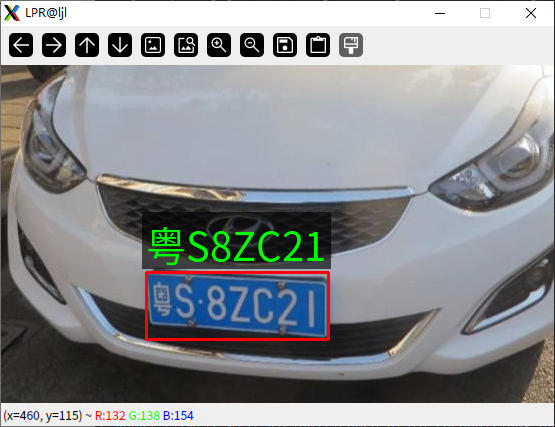
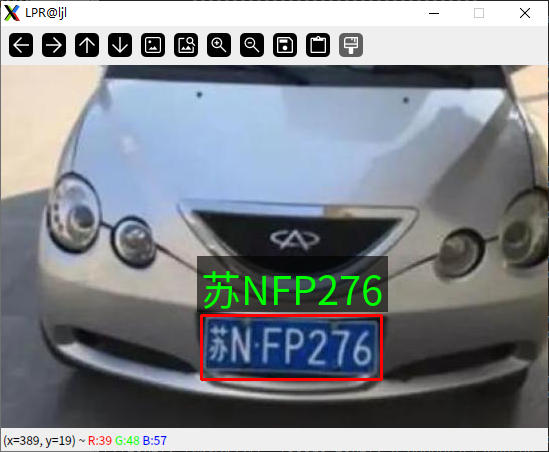
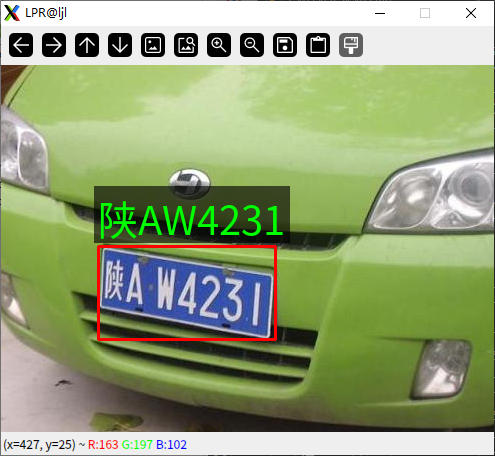
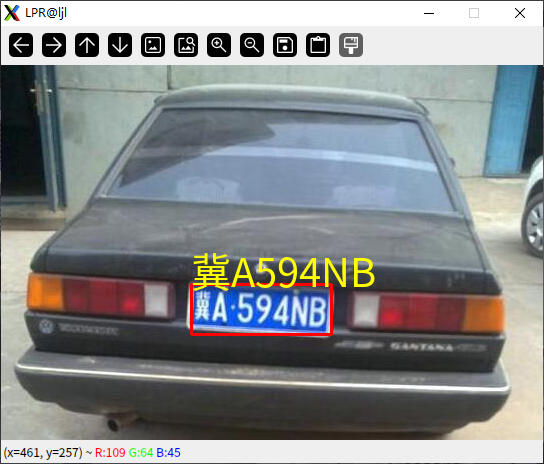
包含多个车牌的情况
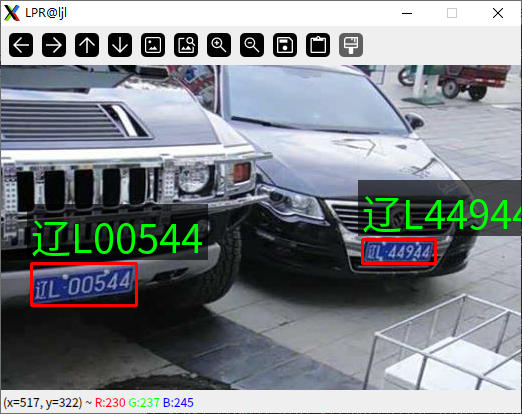
总结
本文介绍了进迭时空 K1 MUSE Pi Pro 开发板结合 LPRNet 算法和 Ultralytics 库实现物车牌识别的项目设计,包括环境部署、软件包安装、模型获取、关键代码以及板端推理等相关流程,为相关产品在边缘 AI 视觉领域的快速开发和应用设计提供了参考。
;}.c{fill:%23555;}%3c/style%3e%3cclipPath%20id='a'%3e%3crect%20class='a'%20width='18'%20height='18'%20transform='translate(1543%202144)'/%3e%3c/clipPath%3e%3c/defs%3e%3cg%20class='b'%20transform='translate(-1543%20-2144)'%3e%3cpath%20class='c'%20d='M182.144,108.918a.7.7,0,1,1-1.407,0V98.083l-.033.027-.054.05-5.045,5.045a.7.7,0,0,1-1.041-.945l.046-.05,5.045-5.045a2.508,2.508,0,0,1,3.477-.031l.075.072,4.988,5.022a.7.7,0,0,1-.949,1.038l-.05-.046L182.21,98.2l-.066-.061Zm5.394-15.827a.7.7,0,1,1,0,1.407h-12.2a.7.7,0,1,1,0-1.407Z'%20transform='translate(1370.601%202051.909)'/%3e%3c/g%3e%3c/svg%3e "回到顶部")